


Have you ever clicked on a link, and instead of the page you wanted, you get a blank screen with “404 Not Found” staring back at you? Wouldn’t you be annoyed? Imagine how irritating it will be for your website visitors. It is very bad for your rankings if it happens too often across a site. Every website, no matter how well built, ends up with broken pages at some point. Pages get deleted, URLs get renamed, migrations go wrong, and suddenly Google Search Console is flagging dozens (sometimes hundreds) of dead links. However, don’t worry.
This guide walks through how to find and fix 404 errors properly, step by step. We will cover why these errors happen in the first place, the tools you can use to catch them early, a priority framework so you’re not wasting time fixing the wrong pages, and the exact fixes for each type of broken link. By the end, you’ll have a repeatable process you can run every month without much fuss.
What Is a 404 Error (and Does It Hurt SEO?)
What is 404 error? In simple terms, it is the HTTP status code that is sent by your server when it receives a request to access a non-existent resource. Consider it as the Internet’s version of ‘sorry, nobody lives here.’
Does it hurt your rankings and search engine optimisation? Not always. As Google has said many times, a certain number of 404 errors is very normal, and it does not automatically hurt your rankings. Instead, it is the surrounding circumstances that affect the ranking negatively. For example, you lose the link equity when the popular pages show 404 error, similarly, you waste your crawl budget when visitors face dead links from your internal navigation.
So, yes, having a single stray 404 error is not going to hurt your website. But a pile of them will.
Why 404 Errors Happen
There are several main reasons for pages being broken. Knowing why the page is broken is very helpful in solving the issue. Here are some of the main reasons and how to prevent 404s in the future:
URL Change or Slug Edit
A content manager changes the slug for the better, or a developer edits the URL structure. As a result, the old link becomes invalid. This reason is very common, and it depends directly on having an SEO-friendly URL structure beforehand. Websites with a well-thought-out URL structure experience this problem much less frequently.
Page Deletion
Deleting a page without taking care of what is linking to it. This reason is common, especially for e-commerce sites, as a part of e-commerce SEO cleanup.
Typos in Internal Links
A content writer may write the link incorrectly while creating a connection to another page. This reason is also quite common. Usually, it is easy to spot such 404s as you can find them right in your content.
Site Migration or Redesign
This is where 404s appear in large numbers when there is no URL mapping. Migration without proper URL mapping means a disaster.
Incorrect Backlinks From Other Sites
Sometimes, the problem lies not in you. For instance, some other website makes a mistake while writing the URL for your link or links to the page that you have already deleted.
How to Find 404 Errors (4 Methods)
To fix the issue, you need to have a list of 404s. Here are four main methods to collect them.
Method 1: Google Search Console
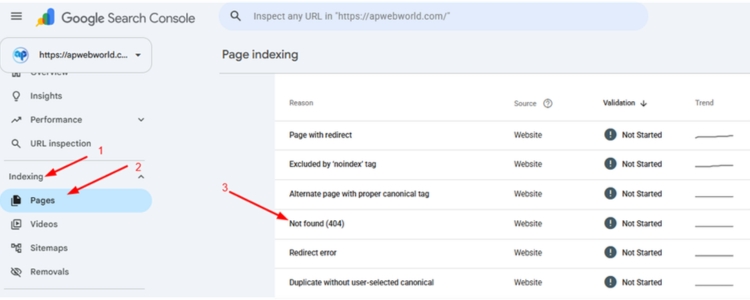
Open Indexing -> Pages -> “Not found (404)”. This report contains all URLs that failed while crawling. This method is free and up-to-date. It is the first thing people try to spot broken links.
Method 2: Screaming Frog (Free Up to 500 URLs)
Crawl your site using Screaming Frog SEO Spider. This software runs on a desktop, is free for websites with up to 500 URLs and finds all links that lead to 404s, not only those that were crawled by Google. Use this broken link checker tool if you need a full audit of internal links.
Method 3: Google Analytics 4
You cannot find a built-in 404 report in GA4, but you can create an event or custom report that tracks pageviews of your 404 page. Tagging your 404 page properly will help to know which 404s get traffic from real visitors.
Method 4: Ahrefs / Semrush
Similar to Screaming Frog, these services will crawl your site and find broken pages. In addition to that, they will check if the broken pages have external backlinks, and this is where they add a lot of value for SEO.
How to Find 404 Errors (4 Methods)
Not all broken links require your actions. Sometimes it is okay to leave the links as is. Use the table below to quickly prioritise and decide what to do.
Priority | Condition | Action |
High | The page has backlinks | Set up a 301 redirect to the closest relevant page |
High | The page still gets traffic | Set up a 301 redirect or restore the page |
Medium | Internal links point to the page | Update the internal links to the correct URL |
Low | The page has no traffic and no links | Ignore it and let it stay a 404 |
This framework alone will save you hours. Most sites have a long tail of old 404s that nobody is visiting and nothing is linking to. Leave those be. Focus your energy where it actually moves the needle, which ties back to tracking the right SEO KPIs rather than chasing every error on the list equally.
How to Fix 404 Errors (5 Fixes)
Here’s how to fix 404 errors once you’ve sorted them by priority.
Fix 1: Restore the Page
Sometimes the fix can be very simple – restore the missing page. If it got accidentally deleted, or if it still held some value (traffic, links, ranking), simply republish the page using the same URL.
Fix 2: 301 Redirect to the Closest Relevant Page
By far, the most common fix is a 301 redirect for 404 pages. Such a redirect transfers most of the page’s authority to a new destination and offers the user a real landing place instead of a dead end. However, do not redirect a page dedicated to running shoes to your homepage; redirect it to your category or a similar post.
Fix 3: Update Internal Links
Locate every link to the broken page on your site and correct it, without using a redirect to resolve the issue. That way, you keep your site clean and save a redirect hop, which is a key element of on-page SEO practices, well described in this guide explaining how on-page SEO boosts website performance.
Fix 4: Fix Broken Backlinks
As for links to the dead page from external sites, you can either redirect the URL to make the link functional or contact those sites and ask them to update the link. The outreach side of this overlaps heavily if you already know what is digital PR work. Reclaiming broken backlinks is also one of the more underrated off-page SEO techniques out there.
Fix 5: Create a Custom 404 Page
As for 404 pages, you are willing to leave as-is, at least, create a custom error page. Include a search bar, links to the categories or other relevant pages, and maybe add some fun elements. The page will not solve the problem, but it will stop visitors from leaving your site.
How to Set Up 301 Redirects on Your Platform
How to redirect 404 pages depends heavily on what platform you’re running:
- WordPress
An SEO-friendly CMS like WordPress makes it very simple for developers and website owners to install plugins. So, install Redirection or redirect manager from Yoast and create a pair of old and new URLs.
- Shopify
Go to Online Store > Navigation > URL Redirects. Here, enter the old and new URL paths.
- cPanel / .htaccess
If your website uses a shared hosting service, the cPanel has a built-in Redirects feature located under the Domains menu. Or you can create redirect rules in .htaccess file. The availability of this feature is a sign of good web hosting, as server issues can cause 404s that have nothing to do with your content.
- Wix / Webflow
These platforms offer built-in features of SEO or URL Redirects management located in Dashboard Settings. No coding skills required, just create a pair of URLs there.
If you need professional SEO services in India, then get professional help.
Mistakes to Avoid
Here are some of the most common mistakes that website developers and website owners make:
- Redirecting every 404 to your homepage: While this seems as a quick solution, it confuses both users and Google and weakens the relevance of the site.
- Creating a redirect chain (from A to B to C): Every additional step adds load time and decreases the SEO value of the page. Redirect to the destination page directly.
- Using 302 (temporary) redirect instead of 301 (permanent): This redirect type means that the move is temporary and the URL is going to be indexed instead of passing the value to the new one.
- Not validating your fixes in Search Console after the changes have been made: This way, you will not know whether the redirect has worked until the next crawl, which may take weeks.
How to Validate Your Fixes
Once a fix is live, don’t just assume it worked.
- Enter the 404 report in Search Console, select the fixed URL and click the Validate Fix button. Then, Google will recrawl that bunch of URLs and inform you of the results.
- Use one of the free redirect checker tools, such as Redirect Checker or httpstatus.io, to check if the redirect works and returns 301 status code.
- Crawl timing varies. Generally, Google validates redirects within a week to two weeks. For large and authoritative websites, validation may happen more quickly.
If you are based in Noida and are struggling with SEO, then partner with an SEO agency in Noida for the maximum results.
Monthly 404 Checklist
Make this a recurring task rather than a one-time cleanup.
- Checked the 404 report in Search Console
- Fixed the broken URLs that get the most traffic
- Tested all redirects
- Updated internal links pointing to broken pages
- Made a list of broken backlinks to reclaim
Conclusion
It is normal to have broken pages on a website after some time since its launch. However, it all comes down to your ability to deal with it. Regularly find them, prioritise them depending on what needs to be fixed, and find a proper solution. Do it once a month, and 404s won’t be an issue anymore. If managing this on top of everything else feels like too much, work with a digital marketing agency that handles technical SEO alongside content.
Frequently Asked Questions
1. Do 404 errors hurt SEO?
Some 404s are normal and do not negatively affect the ranking on their own. The issue starts appearing when high-quality pages with traffic and backlinks are left broken for prolonged periods of time.
2. How long does it take for Google to remove a 404 page from its index?
Usually a few weeks, though it can vary depending on how frequently Google crawls your site.
3. Should I redirect all 404 pages to the homepage?
No. Redirect each page to its closest relevant match. Blanket homepage redirects confuse users and weaken relevance signals.
4. What is the difference between a 404 and a soft 404?
A true 404 returns the correct HTTP status code telling search engines the page is gone. A soft 404 returns a 200 (success) status while showing “page not found” content to the user, which confuses crawlers since the server claims the page exists when it doesn’t.
5. How often should I check for 404 errors?
Monthly is a reasonable cadence for most sites. Larger sites with frequent content changes might want to check biweekly.